

Engineering Home
Read your pipeline, see what to fix next, organise ripped recipes into brands and fill in ingredient details.
Engineering > Home tells you where your recipes stand and what to do next.
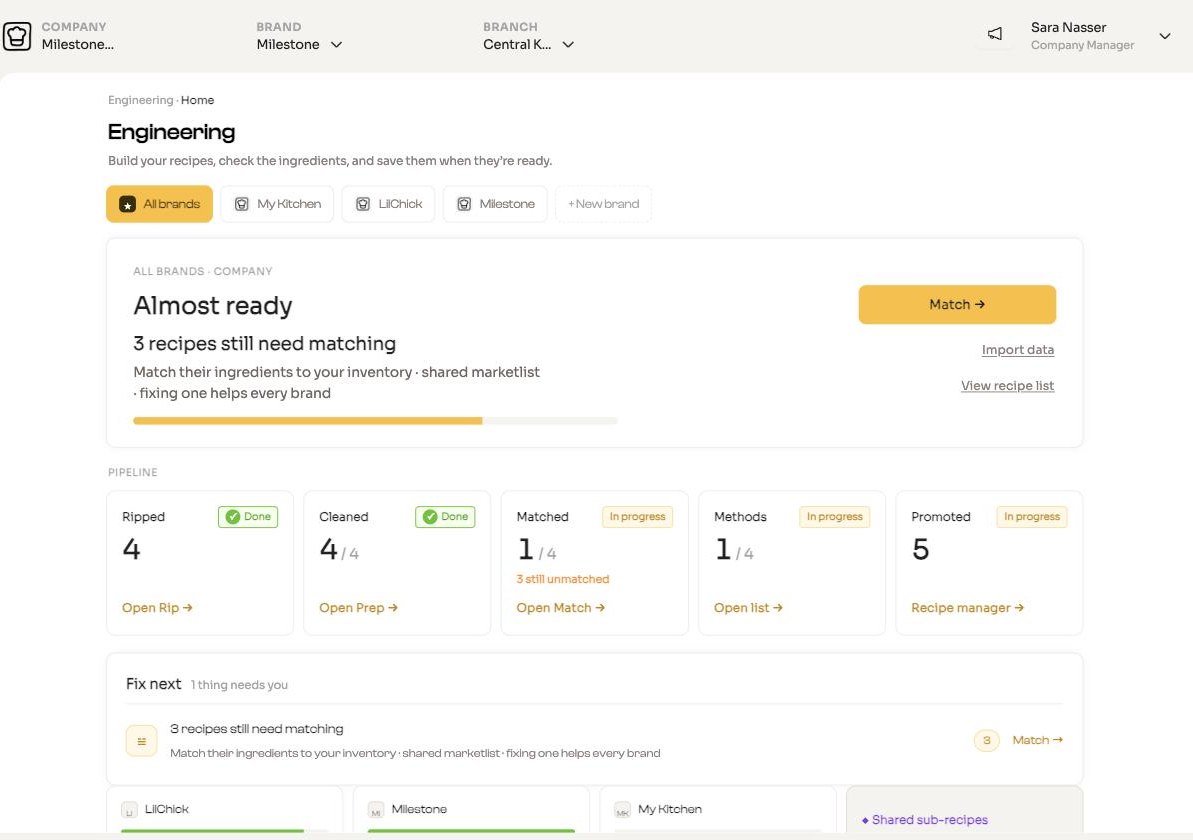
The top of the page
- Brand switcher: All brands, one tab per brand, and + New brand.
- Next action: a readiness word (Just started, Getting there, Almost ready or Ready), the most useful next step, and a button to go straight there. When nothing needs you it says All caught up.
- Import data and View recipe list links.
The first time a free chef opens Home, ChefAdmin asks What should we call your kitchen? Name your brand, or choose Skip for now.
Pipeline
Five cards, each with a status (✓ Done, In progress or Not started) and a count:
| Card | Opens |
|---|---|
| Ripped | Import |
| Cleaned | The Sort tab in Finish recipes |
| Matched | The Match tab in Finish recipes |
| Methods | The Recipes list |
| Promoted | Recipe Manager |
Fix next
A short list of what is holding things up, biggest impact first, for example:
- [n] recipes still need matching. With All brands selected, matching helps every brand because ingredients are shared.
- [n] items missing a category.
- [n] recipes ready to promote.
Each row has a button that takes you to the right screen.
Unassigned recipes
If you imported menu items without choosing a brand, an Unassigned panel appears. Open Organise into brands, tick recipes and use Assign selected to… to move them into a brand, or create one with + New brand….
Complete your ingredients
Open this panel to see ingredients still missing allergens or nutrition. Tap to fill them in for every ingredient at once. What you fill in rolls up into every recipe that uses the ingredient.
Estimates
Calories and allergens filled in this way are AI estimates. Check them against your suppliers' data.
If an ingredient cannot be identified, ChefAdmin lists it. Check the spelling, rename it and run Let me help again.
Finish your recipes
Open this panel to see every recipe still in Engineering, whether it is a Menu Item or a Sub Recipe, and its status (Draft, Pending or Approved). Recipes sent from the chef app show Waiting for approval, sent by [name]. Click Open → to work on one.
Start again
With a single brand selected, Start again clears every unpromoted draft and saved import for that brand. Promoted recipes are kept. This cannot be undone.